


Photo Editing Software
Home Photo Studio gives you the tools to easily enhance and edit digital images.
The program includes photo editing options, such as auto enhancement, retouching, red eye removal, etc. Also, it includes more than 100 special effects that can be applied to the images for a different look, including the unique plastic and 3D composition effects.
Order full version!
How To Improve Scanned Photos
Often scanned photos result in faded colors and low contrast. You can try changing the scanner’s settings, but it still may not fix the issue. For example, we have this photo:

Home Photo Studio allows you to improve scanned photos easily. Just open the scanned photo and use Image > Levels.
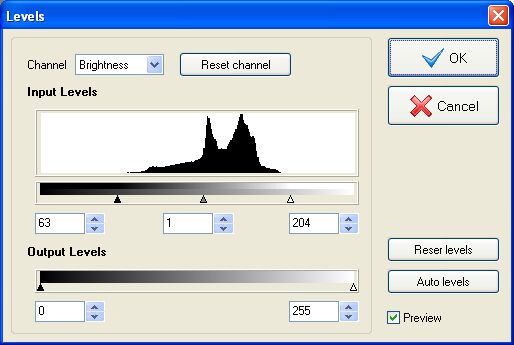
We can see by looking at the Input Levels that the edges of the histogram are cut off. This means that this image has low brightness range which is why it looks faded. In order to increase the brightness range, we need to move the sliders to the right and left edges of the histogram. Now we can see that colors become brighter and some detail appears:

Download your Home Photo Studio now!
The program is compatible with Windows 11, 10, 8, 7